Math and downloads
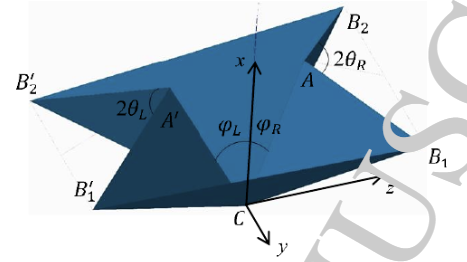
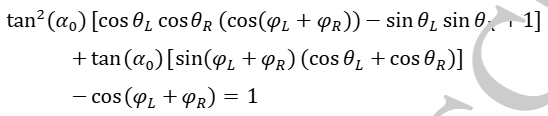
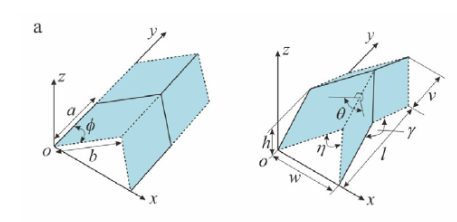
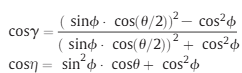
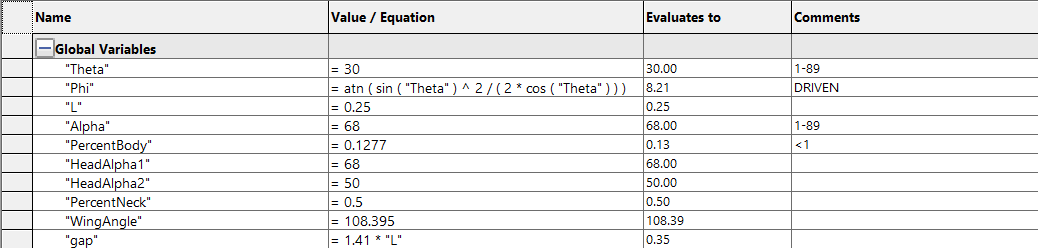
The crane is built with the two patterns below (waterbomb and miura-ori) and they interface in a such a way where they can be modelled pretty much exclusively with the topmost equation to the right of the images. To change how folded the crane is, just change theta.
I also added the ability to change the angle or length of the tail, neck, or head, represented by the alpha and percent values in the variable chart to the right. The base file is linked to the right. I’ve also added the final brace to show how the base file was used in it.
Hello! My name is Matthew Streicher and I’m a Mechanical Engineer graduating from Ohio State this may (2026)
Hope you enjoy this little website I’ve put together.
Can I tell you a secret?
I did it for you!
Base Crane.SLDPRT
Any parameter set as a value can be changed. For the percents, start with small changes. Alphas can be from 1°-89°.
Final Crane Press.SLDPRT
Solidworks is pretty resistant to changes with this one. Theres a chamfer and move face you’ll probably have to delete before changes populate, and if you want to go lower than 30° on theta you’ll have to increase the distance on the 3 visible planes.